Free templates
Video production budget templates
Five budgets for the jobs producers quote most often, built by working producers. Each one is a spreadsheet you can edit and the PDF quote the client would receive.
-
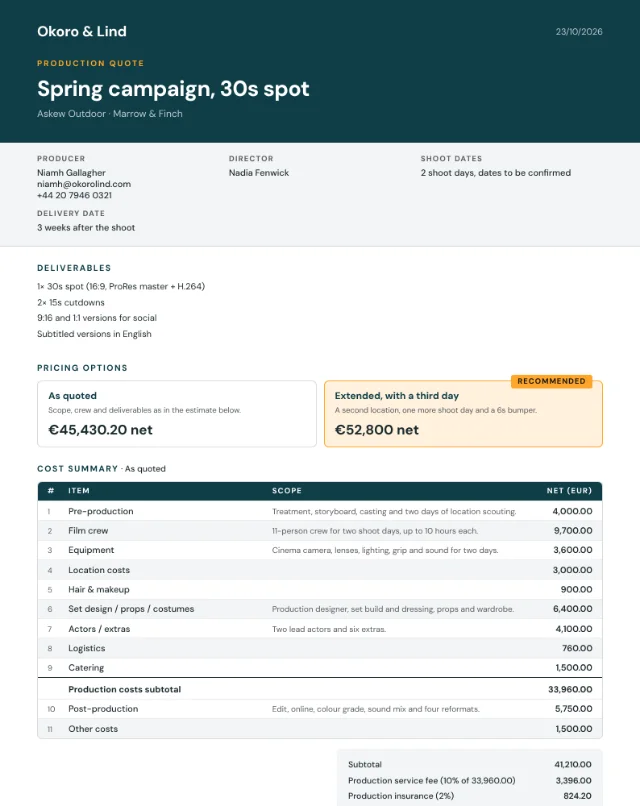 Commercial production budget template
Two shoot days, an 11-person crew, art department and cast.
Sample total €45,430.20
Commercial production budget template
Two shoot days, an 11-person crew, art department and cast.
Sample total €45,430.20
-
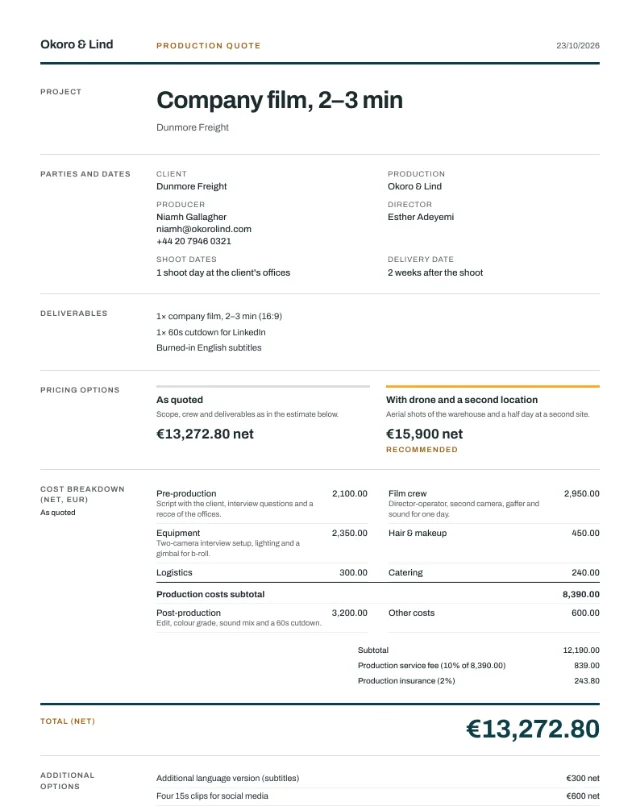 Corporate video budget template
One day, interviews and b-roll, two cameras.
Sample total €13,272.80
Corporate video budget template
One day, interviews and b-roll, two cameras.
Sample total €13,272.80
-
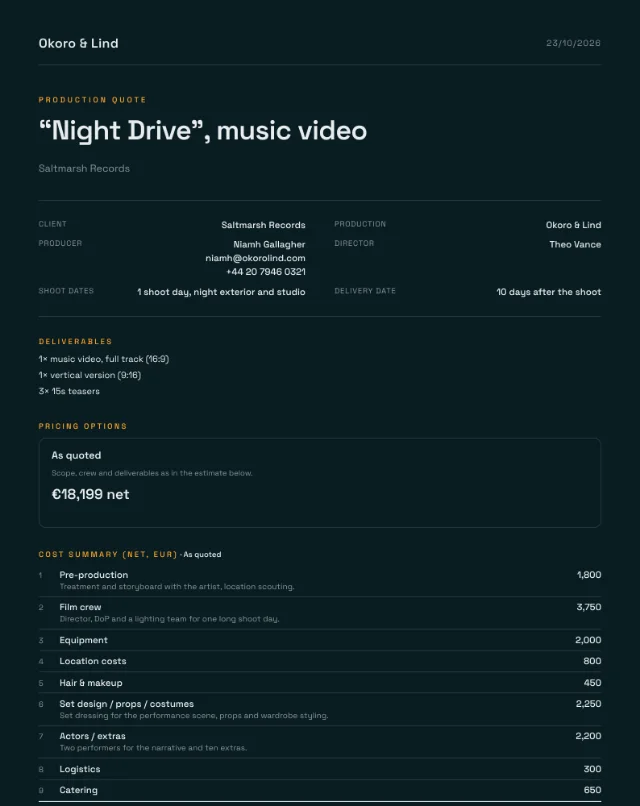 Music video budget template
One long day, performance and narrative, extras.
Sample total €18,199
Music video budget template
One long day, performance and narrative, extras.
Sample total €18,199
-
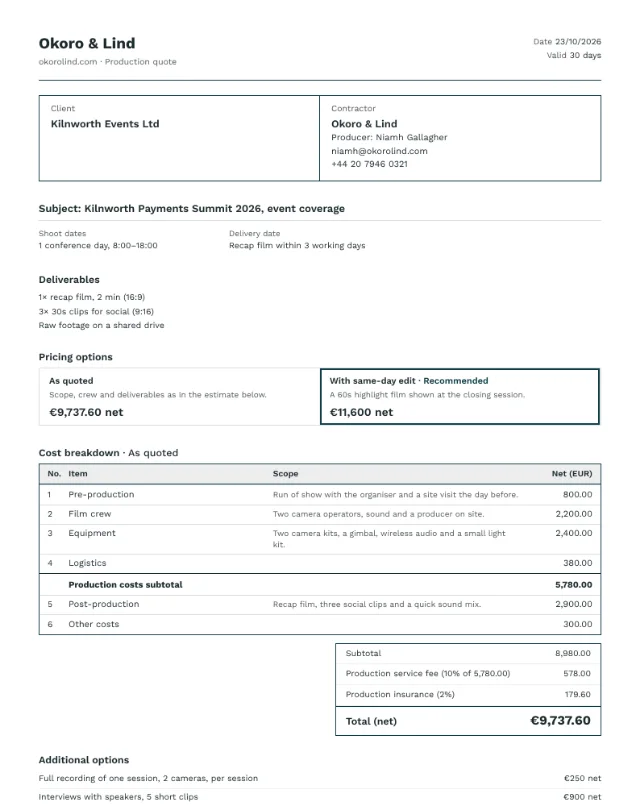 Event video quote template
One conference day, two operators, recap in three days.
Sample total €9,737.60
Event video quote template
One conference day, two operators, recap in three days.
Sample total €9,737.60
-
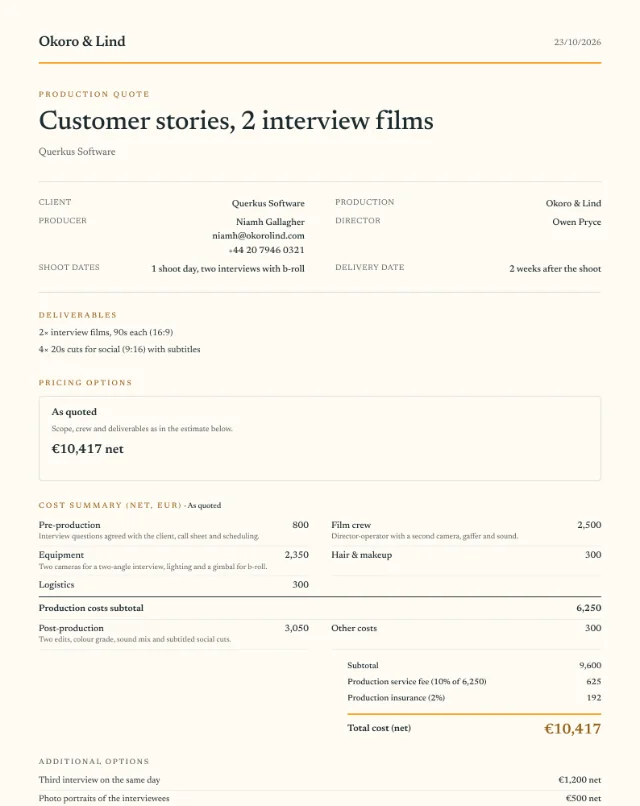 Interview video budget template
Two interview films and four social cuts.
Sample total €10,417
Interview video budget template
Two interview films and four social cuts.
Sample total €10,417
Rates in the samples are illustrative, not market rates. Replace them with your own.
What is in every template
- Line items for each category, with quantity, days and rate
- Category totals and a production costs line
- A production fee on production costs and insurance on the subtotal
- Empty rows in every category for your own lines
- Deliverables and sample terms: shoot day length, overtime, revision rounds and VAT
Why there is a PDF next to it
The spreadsheet is how you cost the job. The client should get something else: the scope, the price options and the total, with the budget behind them if they want to look.
Each template comes with that document, made from the same numbers. It is what Vidaset produces from a budget, in your brand colors.
How the numbers work
Every line is quantity × days × rate
Quantity is people or units, days are shoot or work days. Leave quantity empty and it counts as one, so a flat fee is just a rate.
Production costs sit above the line
Everything you produce yourself: planning, crew, equipment, location, art, cast, logistics and catering. Post-production and licensing sit below it.
The production fee is calculated on production costs
Here 10%. Many producers pass post and licences through without a fee, or charge for them separately. If you work differently, move the line.
Insurance is calculated on the subtotal
Here 2% of all categories. Check what your policy actually requires per job.
Questions
Are the rates in these templates real?
No. They are sample figures so the formulas have something to calculate. Rates differ by country, city and crew, so replace them with yours before you send anything.
Do I need Vidaset to use them?
No. The spreadsheets work on their own in Excel, Google Sheets and Numbers. Vidaset is there if you want your rates filled in automatically and a client-ready PDF from the same budget.
Why is post-production below the production costs line?
Many producers charge their production fee on what they produce themselves and pass post and licences through, or price them separately. If you charge the fee on everything, move the line or change one formula.
Which currency are they in?
Euro. Change the currency label in the header; the formulas work the same in any currency.
Turn the budget into a quote
In Vidaset your rates fill in on every new quote, the fee and insurance calculate themselves, and the client gets a PDF in your brand colors with price options, deliverables and terms. Every new account gets 30 days of Pro, no card required.